Development Setup
Prerequisite
JDK 8 or newer
It is recommended to use Java 8 and Java 11 releases. You can install the JDK as recommended by your operating system, or use the prebuilt binaries from AdoptOpenJDK
SBT
SBT is the most common built tool in the Scala community. You can download it here
Get the code
The Caravan source code is maintained in a git repository hosted on GitHub. To work on Caravan and improve it further, it is necessary to clone the git repository first.
cd your/preferred/directory/
git clone https://github.com/merledu/caravan
Understanding the testing harness
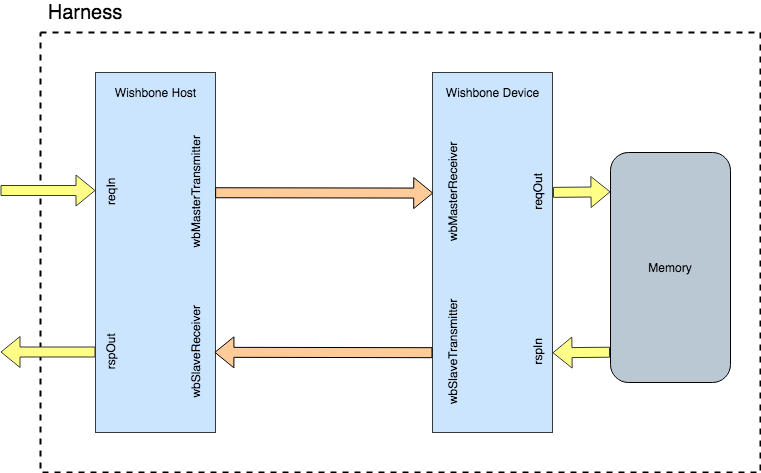
The Caravan has tests written to verify the point-to-point interconnection scheme as well as a 1:N connection scheme with one master and N slaves.
For this purpose an Harness is created that connects a WishboneHost with a WishboneSlave which in
turn connects to a DummyMemoryController. The harness provides a stimuli to the WishboneHost for the bus
communication to start.
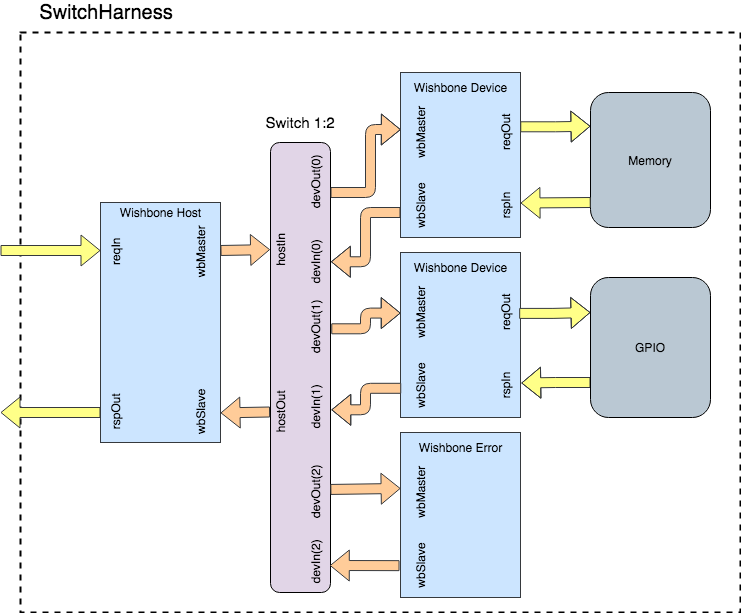
Similarly, a SwitchHarness is created that connects a WishboneHost with a 1:N Switch that in turn connects it with two WishboneSlave adapters one for DummyMemoryController and the other for DummyGPIOController. They are prefixed with ‘dummy’ to indicate their nature, as in they are not meant to be used as IPs in other projects but are made just to test the functionality of the bus interconnects.
Running tests
Note
Running the default test might not work in some cases since the latest commit might have broken the flow.
This would be resolved in future to create a separate branch dev for continuous work and main for
stable running code.
There are tests for both the Harness as well as the SwitchHarness. To run the tests for Harness:
cd caravan
sbt "testOnly wishbone.HarnessTest"
To run the tests for SwitchHarness:
cd caravan
sbt "testOnly wishbone.SwitchHarnessTest"
This would first generate a verilog of the module being tested and all its child modules. Then it will run verilator
to generate the verilated file, finally running the testbench on top of it. To view the emitted verilog file
or verilator specific files go inside the test_run_dir created after running the above command.
To further generate the VCD file for waveform view run the following command:
sbt "testOnly wishbone.HarnessTest -- -DwriteVcd=1"
Similarly,
sbt "testOnly wishbone.SwitchHarnessTest -- -DwriteVcd=1"